Why We Built E-Signature Into Onboard.io
Onboard.io now includes native e-signature: reusable templates, magic-link signing, and a full audit trail, built directly into your onboarding workflow.


Why We Built E-Signature Directly Into Onboard.io
Onboard.io Document Signing is a native e-signature feature built directly into the onboarding platform, letting teams send, sign, and track legally binding documents without leaving their onboarding workflow. You build a signature template once, send it as a standalone document or embed it as a task inside any onboarding project, and your customer signs from a secure link with no Onboard account required. Every completed document ships with a signed PDF and a full audit trail.
We didn't build this because e-signature is trendy. We built it because it kept showing up as a legitimate reason deals stalled and onboarding projects slowed down, ours and our customers'.
Want to see it in your own onboarding workflow? Book a call or explore Document Signing.
The problem: onboarding tools and signature tools have never talked to each other
If you run customer onboarding, you already know this workflow: the contract or the SOW needs a signature, so you leave your onboarding platform, jump into a separate e-signature tool, get it signed, then come back and manually update the status, attach the file, and tell the rest of the team it's done. Multiply that by every onboarding project that touches legal paperwork (service agreements, NDAs, HIPAA forms, W-9s, licensing agreements) and you've got a second system of record living outside the one your team actually works in.
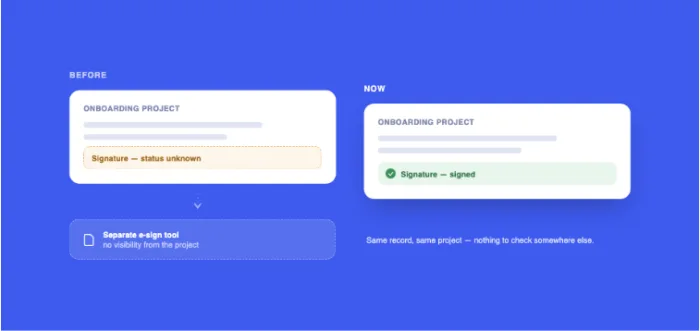
That gap isn't a minor inconvenience. It's where visibility breaks. A signature sitting in a separate inbox doesn't show up on your onboarding timeline. Nobody on the project has a clean answer to "are we blocked on paperwork or not" without leaving the tool and checking somewhere else.
We watched this cost real deals
We track our sales and onboarding conversations closely, and one theme came through consistently: teams wanted their signature step to live inside the same workflow as the rest of onboarding. Prospects told us native e-signature would make Onboard.io an easier yes. Existing customers building out their onboarding workflows pointed to a built-in signature step as the piece that would get their projects to go-live faster. The demand was clear, and it was coming from both the people evaluating us and the people already using us every day.
What we built
Document Signing in Onboard.io is designed to remove the "leave the platform to get this done" step entirely.
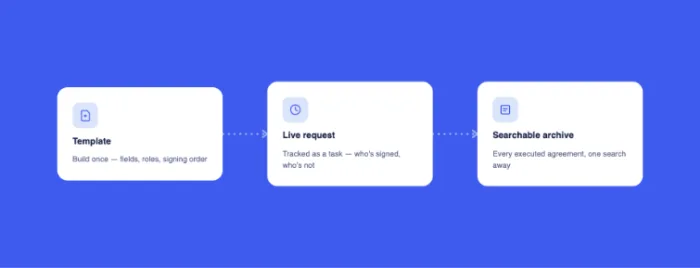
Reusable templates. Upload a PDF once, place your fields, assign signer roles and signing order. Reuse it for every SOW, NDA, or service agreement instead of rebuilding it each time.
Standalone or embedded. Send a template directly to a signer for an ad-hoc agreement, or attach it as a required task inside an onboarding project so it's part of the same workflow your customer is already tracking.
No-login signing. Recipients sign from a magic link. No Onboard account, no password, no friction. They draw, type, or upload a signature and confirm consent before finishing.
A real audit trail. Every signed document comes with a downloadable signed PDF plus a full evidence package, so you have the same legal defensibility as a standalone e-signature tool, without leaving your onboarding system.
Version-safe templates. Project documents are copies, so your master template can't be altered mid-signature-flow, and role-based access means only admins with signing enabled can configure or send requests.
It's live now, and it's free for existing customers through the end of 2026. Starting in 2027 it's included in all Pro plans and available as a paid add-on on Essentials.
Native e-signature vs. a standalone e-signature tool
The distinction that matters most isn't features, it's location. A standalone tool can do everything on this list technically. What it can't do is make a blocked signature visible from inside the tool where your team is already looking.
Does this replace a standalone e-signature tool?
For the specific job of signing a document that's part of an onboarding workflow, yes. If you need enterprise-wide contract lifecycle management across every department, a dedicated tool still has its place. But for the SOWs, NDAs, and service agreements that live inside a customer onboarding project, keeping the signature step in the same system as the rest of the project removes a step, not adds one. That's the actual test: does moving this into Onboard reduce the number of systems your team has to check to know where a customer stands. For onboarding-specific paperwork, it does.
Why this matters beyond the feature itself
The real argument here isn't "we added a checkbox feature." It's that every extra tool in an onboarding workflow is a place visibility goes to die. Time to first value, one of the clearest leading indicators of retention and expansion, gets distorted every time a required step happens somewhere your team can't see it. A contract sitting unsigned in a separate inbox looks identical, from inside your onboarding dashboard, to a contract that was never sent. Both show as "not done." Only one of them is actually a fire.
Bringing signature into the onboarding record itself means a blocked project actually looks blocked, instead of looking fine right up until someone remembers to check email.
Frequently asked questions
Is Onboard.io's document signing legally binding? Yes. Every signed document generates a signed PDF and an audit trail evidence package documenting signer identity confirmation, consent, and timestamps, the same evidentiary standard used by dedicated e-signature platforms.
Does the person signing need an Onboard.io account? No. Recipients sign from a secure magic link and don't need to log in or create an account.
Can I use it for one-off documents, or only inside a project? Yes. Templates can be sent as standalone documents for ad-hoc agreements, or embedded as a task inside an onboarding project.
Is Document Signing free? It's free for existing customers through the end of 2026. Starting in 2027, it's included in Pro plans and available as a paid add-on on Essentials.
Is it SOC 2 compliant? Yes. Onboard.io is SOC 2 Type 2 compliant, and document signing runs under the same compliance posture as the rest of the platform.
More Posts

The True Cost of Bad Onboarding Is Not (Just) Churn

How to Tell if Bad Onboarding Is Causing Your Churn


